Getting an ether.fi Cash card
The virtual card lands the moment KYC clears. The physical one costs $50. Add either to Apple or Google Wallet and you are paying with your phone in any shop that takes Visa.
On 3 September 2026 we opened an account, and the virtual card was issued. The screens below are ours, not borrowed from someone else's write-up. RedotPay refused the same country on the same day.
Virtual card free · physical card $50 · no annual fee · up to 3% cashback. Your keys stay yours, which is the part that makes the first setup feel unfamiliar. This page walks through it. Check your country first — it is not available everywhere.
On the same day, in the same country, one card was issued free in seconds and the other took $10 and refused to activate. 2-3 September 2026, verified first-hand
What the card gives you
| Item | Detail |
|---|---|
| Where it works | It is a Visa card. Anywhere Visa is accepted — supermarkets, department stores, cafés, online, at home or abroad. It settles into the local currency at the till |
| Apple & Google Wallet | Both work, with the virtual card and the physical one. Once added, you tap your phone and you are done |
| Virtual card | Issued instantly on KYC approval. Online payments work before anything ships |
| Physical card | $50 on Core · ships to 80+ countries |
| Annual fee | None. The membership the card comes with is free to join |
| Cashback | Up to 3% — on Core that is the first $2,000 a month, then 1%, then 0.5% |
| Your keys | The company never holds them. Your assets sit in your own vault |
| Spend without selling | Keep staked assets as collateral and the yield keeps running while you spend |
Sources ether.fi help centre — physical cards (updated 10 Jul 2026) · wallet setup (updated 13 Apr 2026) · supported countries (updated 2 Aug 2026). Checked 3 Sep 2026.
Before you start
- Government ID — passport or national ID, plus a liveness check
- Proof of address — required in some regions. A utility bill or bank statement from the last 3 months
- USDC or another supported token to fund the vault
- A shipping address if you want the physical card. It cannot be changed once the order is placed
Step by step
-
Sign up
Go to
ether.fi/sign-upand join The Club membership. It is free, and the card comes with it.Connect or create a wallet and your Safe vault is deployed automatically. Nothing to configure — this is the step people expect to be hard, and it is not.
Screenshot slot — signup screen -
Add the card
The Cards tab has a Get Your Card button. It says "Get your new card in seconds", and that turns out to be accurate.
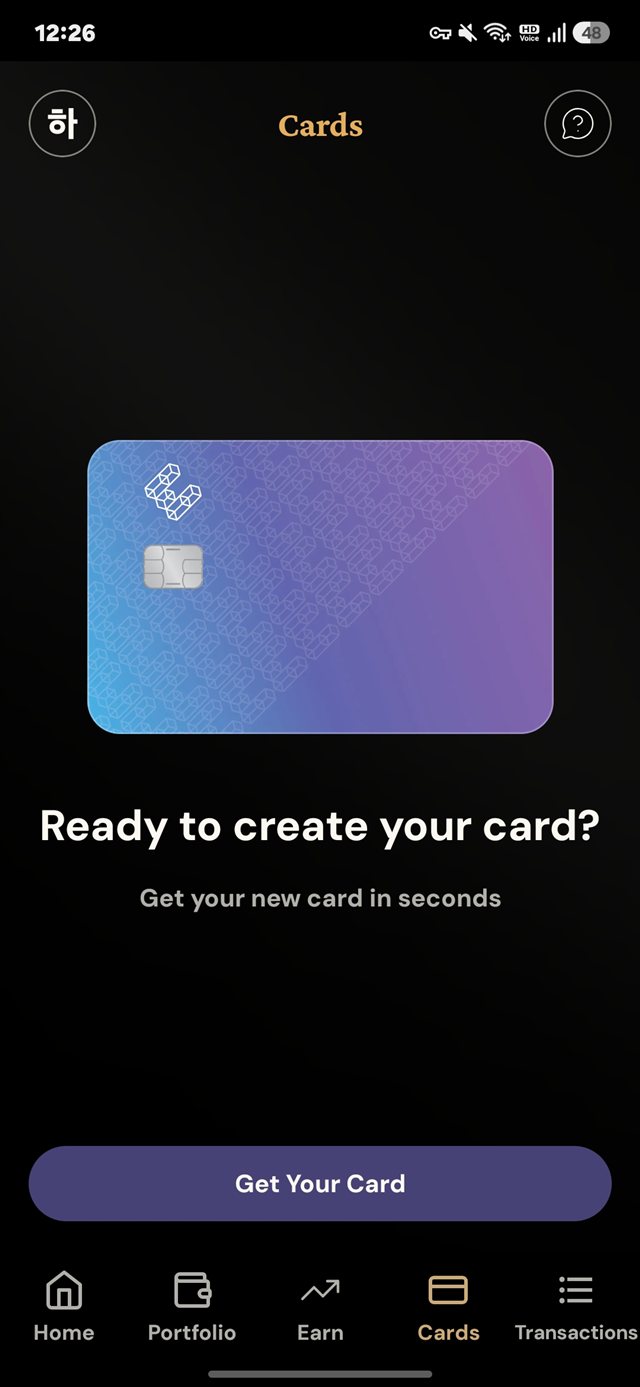
The Cards tab, on our own account (3 September 2026). -
KYC — usually 5 to 30 minutes
Photograph your ID and complete the liveness check. Most approvals are instant; a blurry photo or a busy hour can push it to 4 to 24 hours.
To pass first time: good light, no shadow, all four corners of the ID visible. Glare is what fails most attempts.
Screenshot slot — KYC screen, personal details covered -
The virtual card appears
Once KYC is approved the virtual card is issued immediately, at no cost. The app describes it as "accepted by 100M+ merchants worldwide — use with Apple/Google Pay and online".
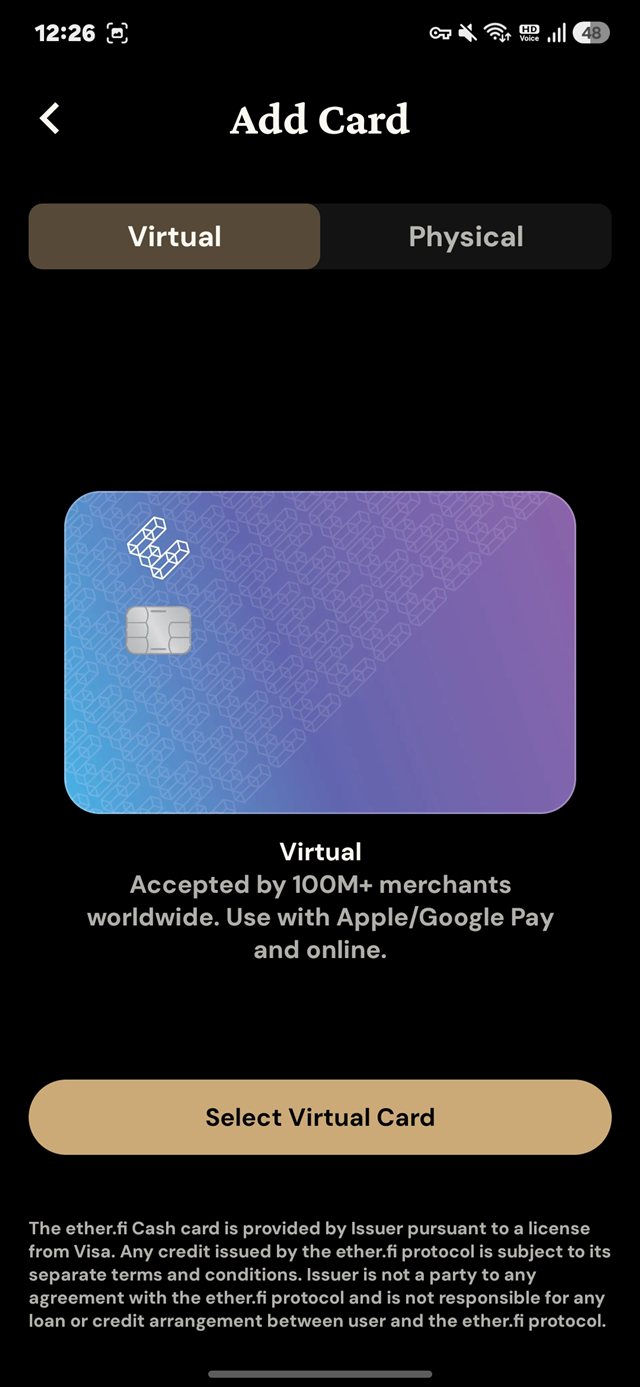
No price on this screen, because there is none. -
Fund the vault
Send USDC or another supported token to your vault. Several chains can be used to top up.
ether.fi Cash runs on OP Mainnet. It used to sit on Scroll and moved in 2026 — 70,000 active cards and $220M of TVL in three days, with no downtime, the largest single deposit in Optimism's history.
Get the chain list from the appScreenshot slot — top-up screen showing chain and feeether.fi does not publish a supported-chain list, and the set changed repeatedly through 2026 — bridging was retired on eight chains including Scroll, zkSync and Blast in June, and Cash then moved to Optimism.
So the answer to "which chain" is whatever the deposit screen says. Do not send based on a list in someone's article. The wrong chain loses the money, and there is no undo.
-
Add it to Apple or Google Wallet
Google Wallet is one tap. There is an "Add to Google Wallet" button under the card in the app. Nothing to copy across.
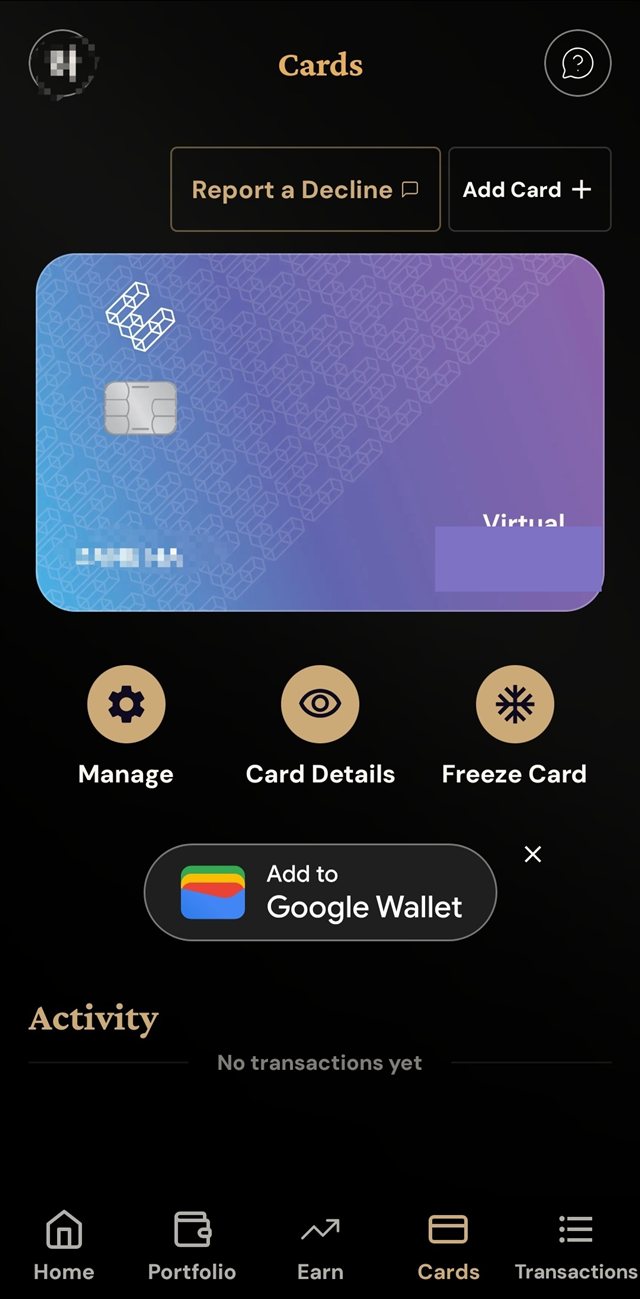
Straight after issuance. Freeze Card and Report a Decline sit on the same screen. Apple Wallet is manual. Open Card Details for the number, expiry and CVV, then Wallet → + (top right) → Debit or Credit Card → enter them.
Each device may ask to verify separately, but the same card can live on several devices.
Screenshot slot — card added to wallet -
Order the physical card once you know it works ($50)
Make one payment on the virtual card first. Do it in that order and a problem costs you nothing instead of $50.
It is listed as Core Plastic at $50.00 USD, described in the app as spending online and locally plus ATM access worldwide.
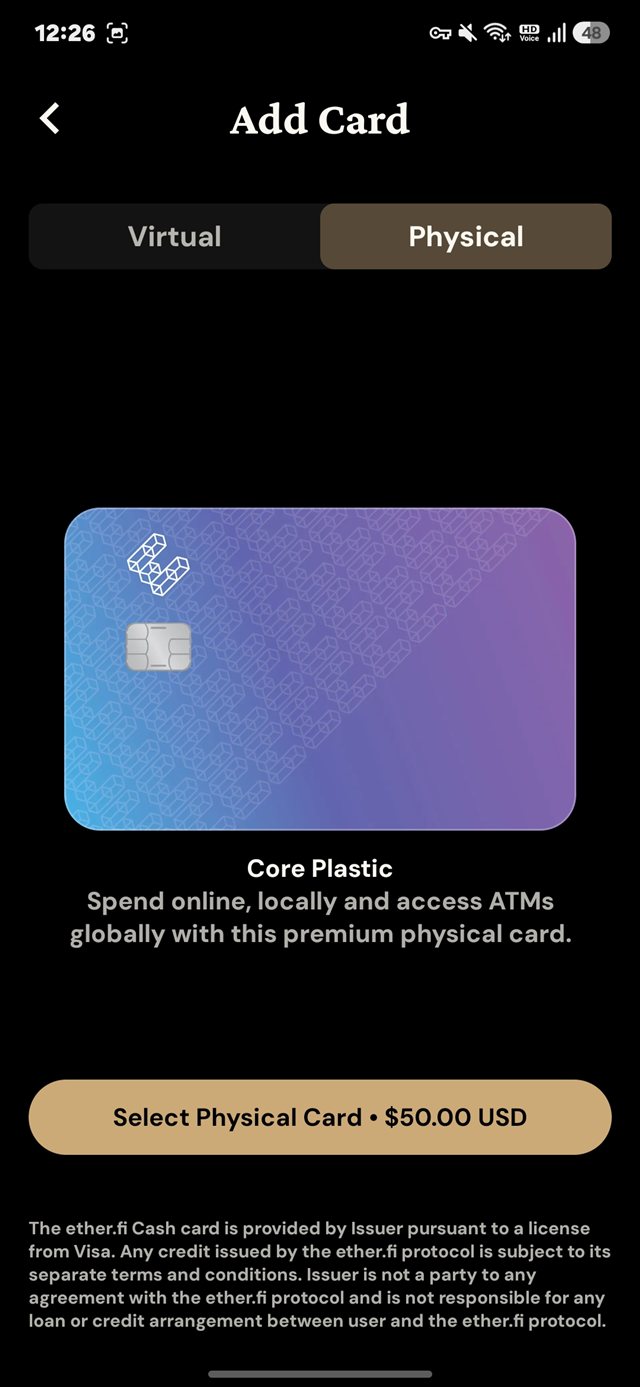
The order screen. The small print confirms the card is issued under licence from Visa. Standard shipping runs 15 business days or more, and the address cannot be changed after ordering. Read it back before you submit.
Screenshot slot — physical card order screen -
Activate it when it arrives
Confirm receipt in the app and set a PIN under Edit Card → Set PIN. Both cards stay active on the same balance — use whichever suits.
Screenshot slot — physical card received, PIN set
Where people get stuck
"Apple Pay is not available in your region" means your iPhone region and your Apple ID country do not match. Set both to the same country and it clears. Nothing is wrong with the card.
| Symptom | Cause and fix |
|---|---|
| KYC rejected | Nearly always glare, shadow or a cropped corner. Retake it in better light |
| Proof of address asked again | It must be within 3 months and carry a visible date |
| Declined at the fuel pump | Pay-at-pump declines are reported. Paying inside works |
| Cashback never arrived | ATM withdrawals, cash advances, P2P transfers and some merchant categories never earn cashback. A refund also reverses cashback already paid |
| Physical card has not come | Standard shipping is 15+ business days, plus customs |
What the marketing leaves out
Most write-ups skip this. Worth knowing before you sign up.
| The claim | The terms |
|---|---|
| 0% FX | The 0% applies to USD and EUR only. Every other currency carries 1%. Spending in pounds, yen, won or anything else is a 1% charge. The 3% cashback runs alongside it, so on Core up to $2,000 a month you are still +2% net |
| Up to 3% cashback | Banded by tier. Core earns 3% on the first $2,000 a month,
then 1%, then 0.5%. The terms also carry a $1,000 monthly ceiling that the marketing omits |
| ATM withdrawals | 2% · $250 per rolling 24 hours · 3 attempts |
| Spend against your holdings | Borrow Mode charges interest from the first moment, with no grace period, and a position past the threshold gets liquidated |
We read the $50 off the order screen ourselves. Some reviews describe a "$40 deposit" instead — that is wrong. We write from the screen.
Direct Pay or Borrow Mode
| How it works | Interest | |
|---|---|---|
| Direct Pay | Takes USDC first, then LiquidUSD, straight from the vault | None |
| Borrow Mode | Borrows against your assets so you never sell them | Starts immediately, variable |
Leave it on Direct Pay to begin with. "Spend without selling" sounds free. It is a loan, with interest and a liquidation threshold attached.
Tiers widen the 3% band
| Tier | 3% applies up to | How you get there |
|---|---|---|
| Core | $2,000 a month | Where everyone starts |
| Luxe | $10,000 a month | 10,000 points a month, or 15,000 ETHFI held |
| Pinnacle | $50,000 a month | 50,000 points, or 100,000 ETHFI held |
| VIP | 4% cashback | Invite only |
Core is enough for most people. $2,000 a month covers ordinary spending, and buying ETHFI to climb a tier exposes you to token price risk far larger than the cashback.
70,000 active cards across 300,000 accounts. Moving Cash to Optimism in 2026
shifted $220M of TVL in three days with no downtime — the largest single
deposit Optimism has recorded.
Five audits, a CertiK A rating, a
$300K Immunefi bounty and Nexus Mutual cover.
It never takes custody of your keys.
That said, the card issuer is not a bank and there is no deposit insurance.
What you hold is crypto in your own vault, not a bank balance.
Public audit reports · cardholder terms · checked 3 Sep 2026.
Sources disagree on the issuer's name, so we do not state it.
The virtual card is free. Try it, then order the $50 physical one if it suits you.